
Supercharge Your Browser with 1-Click Captures
The DORO Connector extension seamlessly bridges your web browser to the DORO desktop engine. Intercept large files, catch HLS video streams, and download online media directly from web pages.
Floating Video Downloader on Web Players
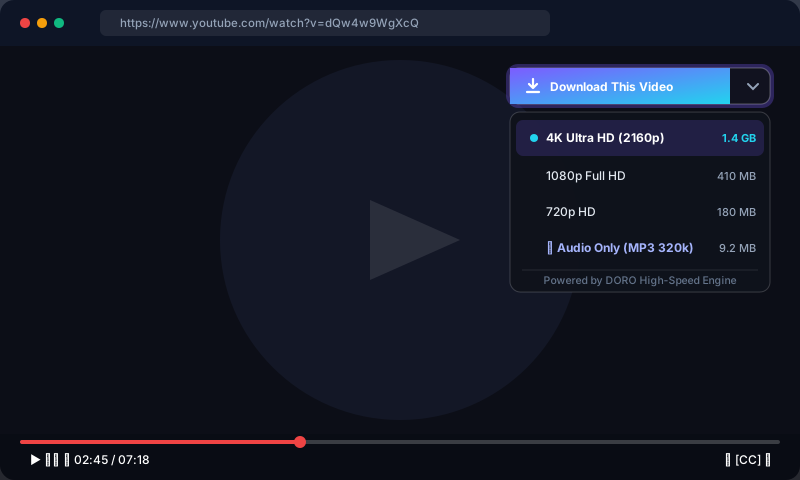
Just like IDM’s famous on-page download bar, DORO places a sleek, non-intrusive floating button right above HTML5 video players on YouTube, Vimeo, Twitch, and news sites.
The button runs inside an isolated Shadow DOM to ensure zero visual conflicts with website styles. Clicking it opens a dropdown listing all available video resolutions (4K, 1080p, 720p) and MP3 audio streams.
Any download of .zip, .exe, .iso, .pdf, .rar, .7z, or files over 512 KB in your browser is automatically intercepted, passed to DORO, and accelerated across 32 connections.
How to Install in 3 Easy Steps
Compatible with all Chromium browsers (Chrome, Edge, Brave, Opera, Vivaldi) and Mozilla Firefox.
Open Extension Manager
Navigate to your browser’s extension settings page:
Edge: edge://extensions
Brave: brave://extensions
Then switch on Developer mode (toggle in the top-right corner).
Load Unpacked
Click the "Load unpacked" button in the top-left toolbar of the extensions page.
Select the unpacked extension/ folder from your DORO install directory:
Start Downloading
That’s it! The DORO icon will appear in your browser toolbar with a green status indicator.
Downloads will now automatically route through DORO, and floating video buttons will appear on web players.
🔒 Security & Loopback Privacy Architecture
The DORO browser extension communicates with the desktop application via a loopback-only HTTP server bound exclusively to 127.0.0.1:6870.
- Zero External Cloud Relays: Your download URLs, session cookies, and referrer headers never leave your physical computer.
- Strict Origin Validation: The local API rejects any web page requests, only accepting messages stamped with internal browser extension IDs and secret
X-DOROauthentication tokens. - Manifest V3 Compliant: Built strictly according to modern Google Chrome and Mozilla security guidelines without legacy NPAPI binary plugins.